New, unopened, and in the original package.
$25 cash only.
Pickup is near Purcell, OK
(35 miles south of OKC off I-35).
____________________________
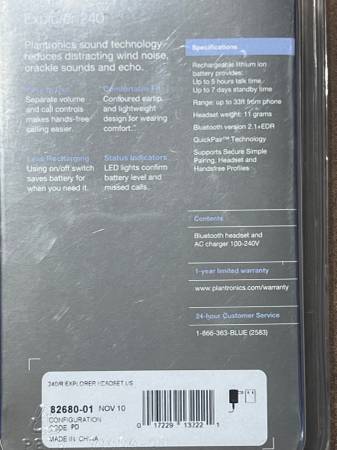
Bluetooth headset with charger.
Universal compatibility.
Rechargeable.
Up to 5 hugs talk time.
Up to 7 days standby time.
33 feet of range from your phone.
Separate volume and call controls, makes handsfree calling easier.
Contoured earth, lightweight for wearing comfort.
LED lights confirm battery level and missed calls.
Swiveling earloop for right or left ear.
___________________________________________________________________________________________________________
The Plantronics Explorer 240 Bluetooth Headset is a high-quality, single earpiece headset designed for reducing noise and wind during calls. With its ear-hook form factor and built-in microphone, this headset offers comfortable use for extended periods. The black color and sleek design make it a stylish accessory for home telephones or on-the-go use. It features Bluetooth and USB connectivity options for versatility in connecting to various devices. The Plantronics Explorer 240 is a reliable and convenient choice for improving communication in noisy environments.
A classic, lightweight (11g) Bluetooth 2.1 headset designed for hands free calling. It features a swiveling earloop for left or right ear use, separate on/off slide switch to preserve battery, and Digital Signal Processing (DSP) to reduce wind and background noise. It delivers up to 5 hours of talk time.
Features and Specifications
• Design: Glossy plastic body with a chrome finish and silicone eartip.
• Battery Life: Up to 5 hours of talk time and 7 days of standby time.
• Audio: DSP technology for echo, wind, and noise reduction.
• Controls: Dedicated buttons for volume, call answer/end, and a physical power slider.
• Connectivity: Bluetooth 2.1 with QuickPair technology for fast setup.
Pairing Instructions
To connect the Explorer 240 to your phone:
1. Turn on your phone's Bluetooth feature.
2. Turn on the headset by sliding the Power Switch toward the microphone.
3. Wait until the indicator light flashes red and blue (this puts the device in pairing mode). (If it doesn't flash, turn it off and on again, or press and hold the Call Control button until the red and blue flashes appear).
4. Go to your phone's Bluetooth menu, search for devices, and select Explorer 240 to connect